
Website vs Web Application: What's the Difference?
A business website and a web application can look surprisingly similar.
Both can have a navigation bar, pages, buttons, forms, dashboards, and even a login screen. From the outside, it is not always obvious where a website ends and a web application begins.
I've worked with both, and one thing I've noticed is that people often choose the technology first and the actual problem second.
Someone says they need a "web app" when what they really need is a good business website. Someone else starts with a simple website and eventually realizes they are trying to force an entire business workflow into a collection of pages.
The difference becomes much easier to understand when you stop looking at how something looks and start looking at what it does.
A website primarily presents information. A web application lets people do things with information.
That isn't a perfect technical definition, but it is a very useful one when deciding what to build.
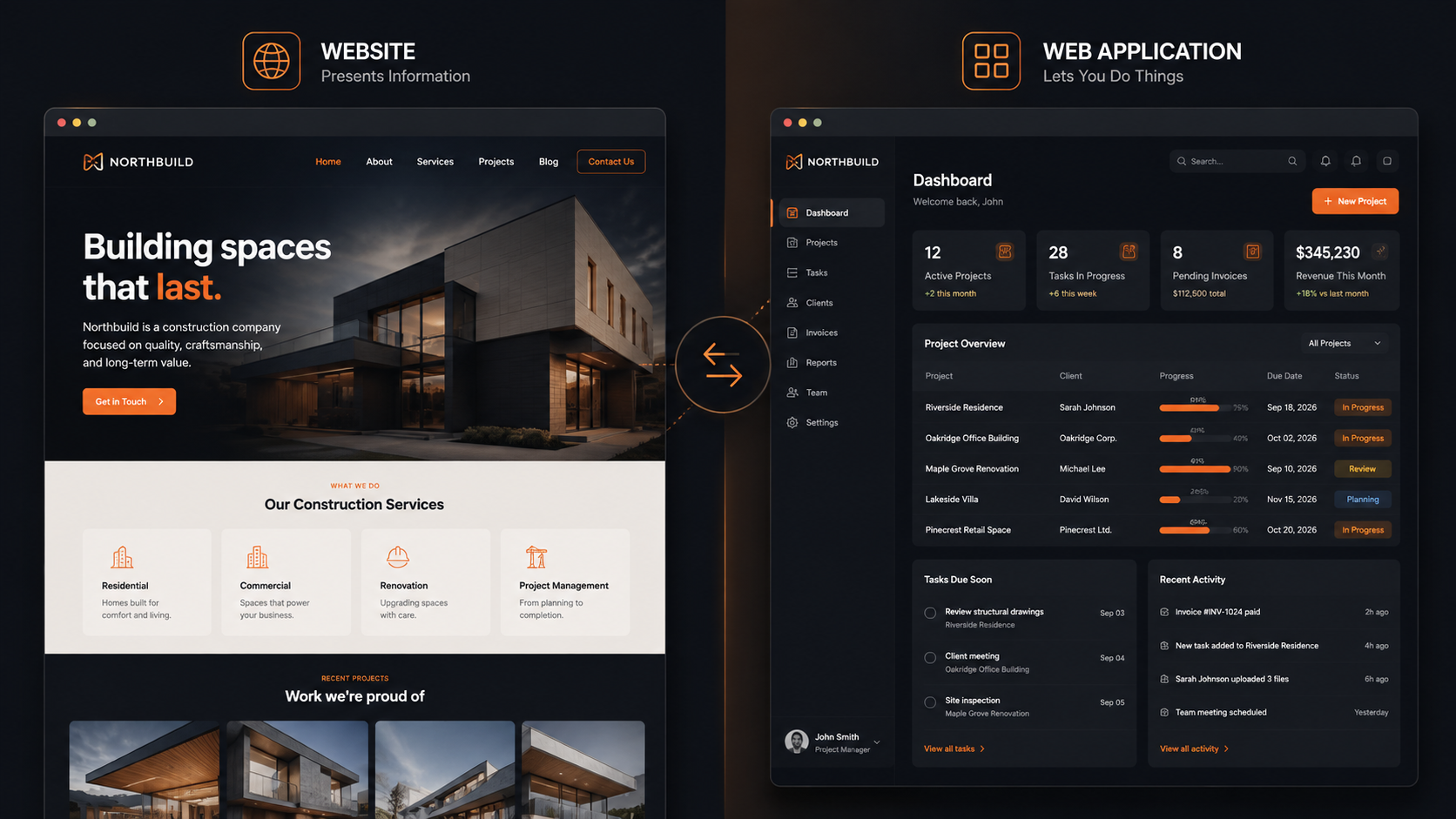
What is a website?
A website is primarily built to communicate information.
Think about a typical business website. You might have:
- A home page
- About page
- Services
- Product or service details
- Portfolio or work
- Contact page
- Blog
A visitor comes to the website, reads information, looks at images, understands what the business offers, and eventually gets in touch or takes another intended action.
There can still be plenty of interaction. Contact forms, search, animations, calculators, booking forms, and other features can all exist on a website.
But the main purpose is still communication.
For example, if you run a construction company, your website might explain:
What you build → where you operate → examples of your work → why customers should choose you → how to contact you.
That is a website doing its job.
What is a web application?
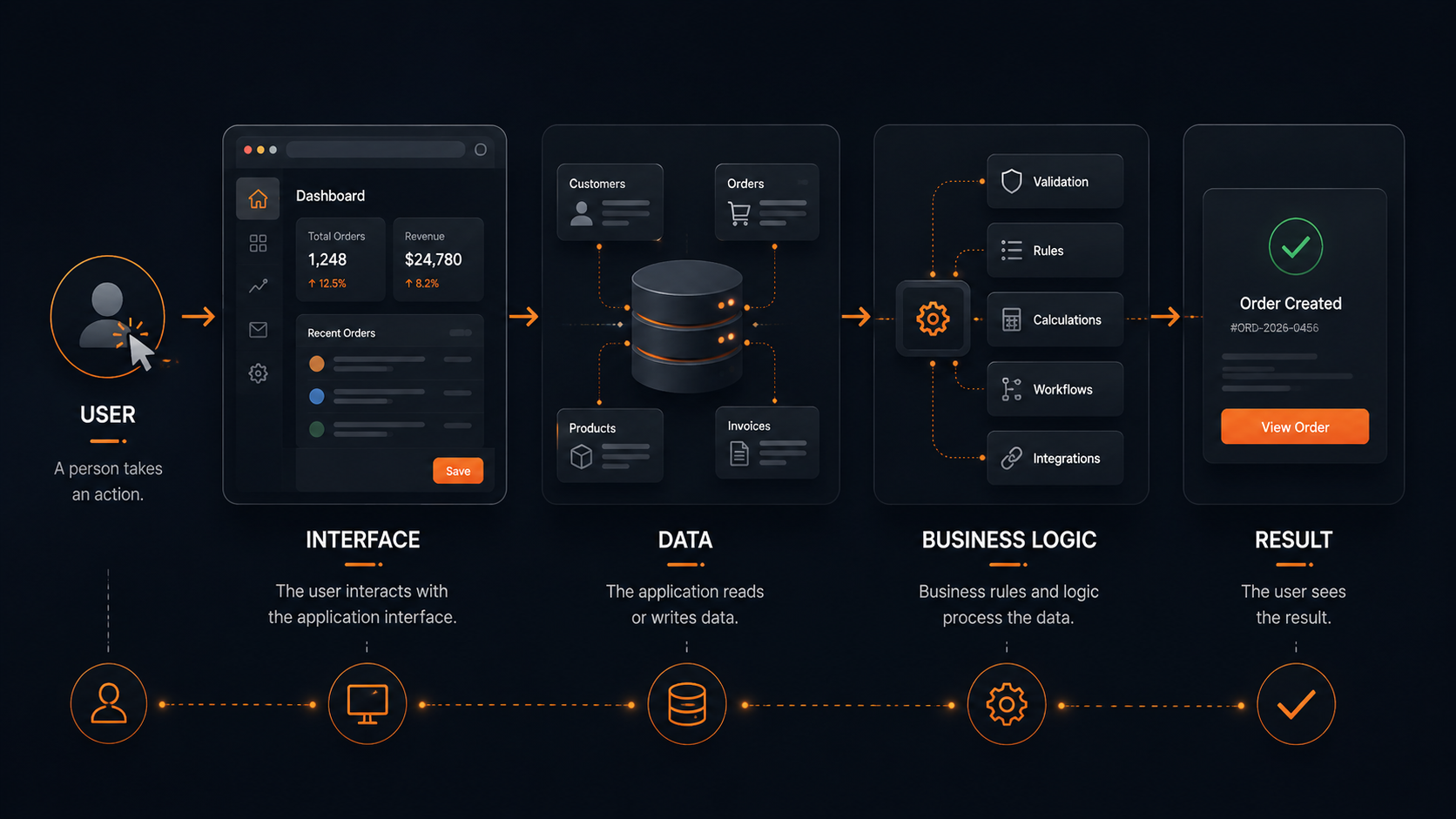
A web application is different because the user isn't just consuming information. They are using a system.
A web application might allow someone to:
- Create an account
- Log in
- Create and edit records
- Upload files
- Manage products
- Generate invoices
- Track orders
- View reports
- Manage employees
- Communicate with other users
- Configure settings
- Perform business processes
The browser becomes an interface to software rather than simply a place to read about a business.
A customer management system is a good example.
Instead of simply displaying information about a company, the application might allow an employee to log in, find a customer, update their details, add a note, create an invoice, and see previous interactions.
That is a fundamentally different problem.
The confusing part: websites can be interactive too
This is where the terminology gets messy.
A modern website can have plenty of functionality.
Imagine a website for a hotel where visitors can:
- Select dates.
- Choose a room.
- Enter their details.
- Pay online.
- Receive a confirmation.
Is that a website or a web application?
The answer isn't always important.
There is no universal line where something suddenly stops being a website and becomes a web application.
What matters more is the complexity of the interaction and the underlying system.
A simple contact form doesn't suddenly turn a marketing website into a web application.
But if the website becomes a system where customers have accounts, bookings, payments, history, notifications, and management interfaces, you're now dealing with application-level functionality.
That's the distinction I find much more useful in real projects.
A simple way to think about it
Ask yourself this:
"After someone visits this, are they mainly trying to understand something or accomplish something?"
If they're mainly trying to understand, you probably need a website.
If they're mainly trying to accomplish, you may need a web application.
For example:
| What the user wants to do | Usually |
|---|---|
| Learn about a company | Website |
| Read about services | Website |
| View a portfolio | Website |
| Read articles | Website |
| Submit a contact request | Website |
| Book an appointment | Website or application |
| Manage an account | Web application |
| Manage business records | Web application |
| Generate invoices | Web application |
| Track orders | Web application |
| Manage inventory | Web application |
| View a business dashboard | Web application |
There is obviously some overlap. A good booking system can live inside a business website, for example.
The table isn't a technical rule. It's simply a useful way to identify what you're actually building.
The biggest difference is usually behind the screen
One of the easiest mistakes is judging a project by its interface.
A login screen doesn't automatically mean you're building a complex application.
The more important questions are:
- What data is being stored?
- Who can access it?
- What can users change?
- What happens after they submit something?
- Are there different types of users?
- Are there business rules?
- Does the system communicate with other services?
- Does the application need to remember previous actions?
- Does someone inside the business need to manage everything?
The more of these questions you answer with "yes", the more likely you are dealing with a web application.
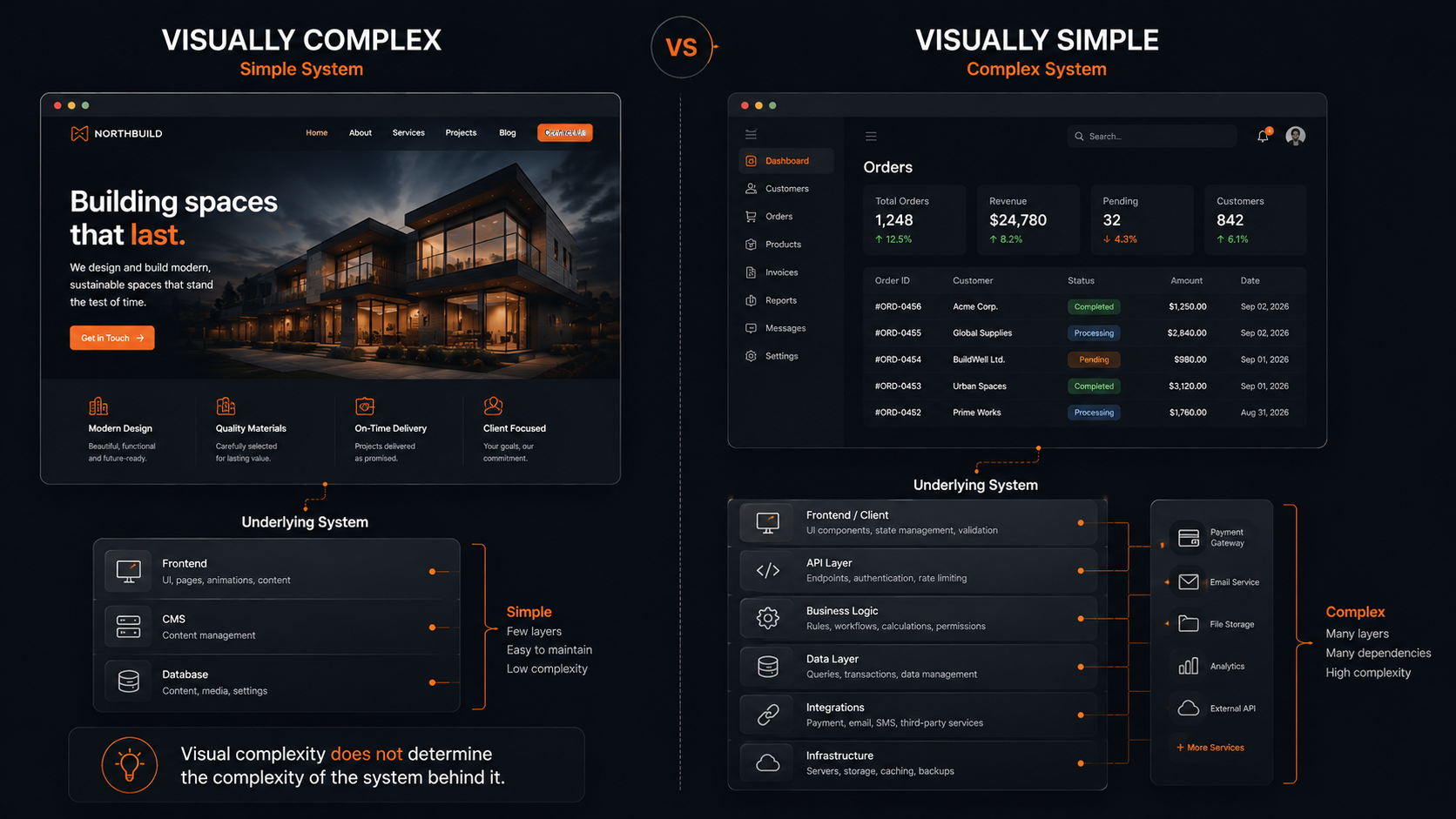
A website can be visually complicated while having a relatively simple backend.
A web application can look extremely simple while having a surprisingly complicated system behind it.
That's why judging by appearance alone can be misleading.
An example from a real business
Imagine a small business that currently handles customer orders through WhatsApp and spreadsheets.
At first, they might think:
"We need a website where customers can place orders."
That sounds like a website project.
But after discussing how the business actually works, more requirements start appearing:
Customers need accounts.
Orders need statuses.
Employees need to update those statuses.
The business needs to see all orders in one place.
Customers need order history.
Products need to be managed.
Inventory needs to be tracked.
Invoices need to be generated.
Managers need reports.
Suddenly, the project isn't really just a website anymore.
The public-facing website might still be part of it, but there is now a software system behind it.
This is why understanding the business workflow before deciding what to build is so important.
What about e-commerce?
E-commerce sits somewhere in the middle, which is why it causes so much confusion.
An online store is technically a website, but a serious e-commerce system contains many application-like features.
There may be:
- Product management
- Customer accounts
- Shopping carts
- Orders
- Payments
- Inventory
- Discounts
- Shipping
- Notifications
- Admin dashboards
- Reports
For a small store with a relatively simple catalog, an existing e-commerce platform may be more than enough.
For a business with unusual pricing rules, complex inventory, multiple workflows, or integrations with existing systems, custom application development may become necessary.
So I wouldn't get too caught up in whether an e-commerce project is "a website" or "a web app."
The better question is:
How much software does the business actually need?
When a website is the better choice
A website is usually the right starting point when your primary goals are things like:
- Establishing an online presence
- Explaining your services
- Generating leads
- Building credibility
- Publishing content
- Showing products or services
- Helping customers contact you
If a visitor can accomplish what they need without maintaining an ongoing relationship with the system, a website may be all you need.
And that's not a limitation.
A well-built business website can be incredibly valuable without having a complicated application behind it.
In fact, adding unnecessary functionality can make a project more expensive and harder to maintain without providing any meaningful benefit.
When a web application makes more sense
You should start thinking about a web application when the business depends on people repeatedly interacting with a system.
Some common signs are:
You are managing a lot of data
If you're constantly maintaining spreadsheets, records, documents, or databases manually, a dedicated application might make sense.
Different people need different access
If an employee should see different information from a manager or customer, you are moving toward an application.
Your workflow has multiple steps
If something moves through states such as:
New → Reviewed → Approved → Processed → Completed
you probably have a business process that could be represented in software.
You repeat the same manual work
If employees repeatedly copy information between spreadsheets, emails, documents, and other systems, there may be an opportunity for automation.
Customers need their own space
Accounts, order history, saved information, subscriptions, documents, dashboards, and similar features usually push a project toward application territory.
You don't always need to build everything from scratch
Another mistake I see is assuming that needing a web application means you have to build a huge custom system immediately.
You don't.
Sometimes an existing tool already solves most of the problem.
For example, a business might need a basic CRM, invoicing system, appointment system, or e-commerce platform. If an existing product handles the workflow well, using it can be considerably more sensible than developing a replacement.
Custom development becomes more interesting when the business has requirements that existing software doesn't handle well.
The goal shouldn't be:
"Let's build custom software."
The goal should be:
"Let's solve this business problem in the simplest way that works."
Sometimes that means a website.
Sometimes it means an existing platform.
Sometimes it means a custom web application.
What happens when you choose the wrong one?
Choosing a website when you really need an application usually leads to a collection of workarounds.
You start with a few forms.
Then someone adds a spreadsheet.
Then another spreadsheet appears.
Someone starts manually emailing customers.
An employee keeps a separate document to track status.
Eventually, everyone is working around the website instead of using it as a proper system.
The opposite can be just as problematic.
Building a custom application when all you needed was a straightforward business website adds unnecessary development, maintenance, hosting, and complexity.
I've found that the best projects usually start by understanding the workflow first and choosing the technology second.
So, which one do you need?
You don't need to know the technical terminology before starting a project.
Start with the business problem.
Ask:
- What do I want visitors or customers to do?
- What information needs to be stored?
- Who needs access to that information?
- What does my team currently do manually?
- Are there repetitive processes we want to automate?
- Do customers need accounts or ongoing access?
- Do we need a dashboard or management system?
- Are existing tools already capable of handling the requirement?
The answers will usually make the direction much clearer.
If the primary job is presenting your business, you're probably looking at a website.
If the primary job is helping people perform tasks through software, you're probably looking at a web application.
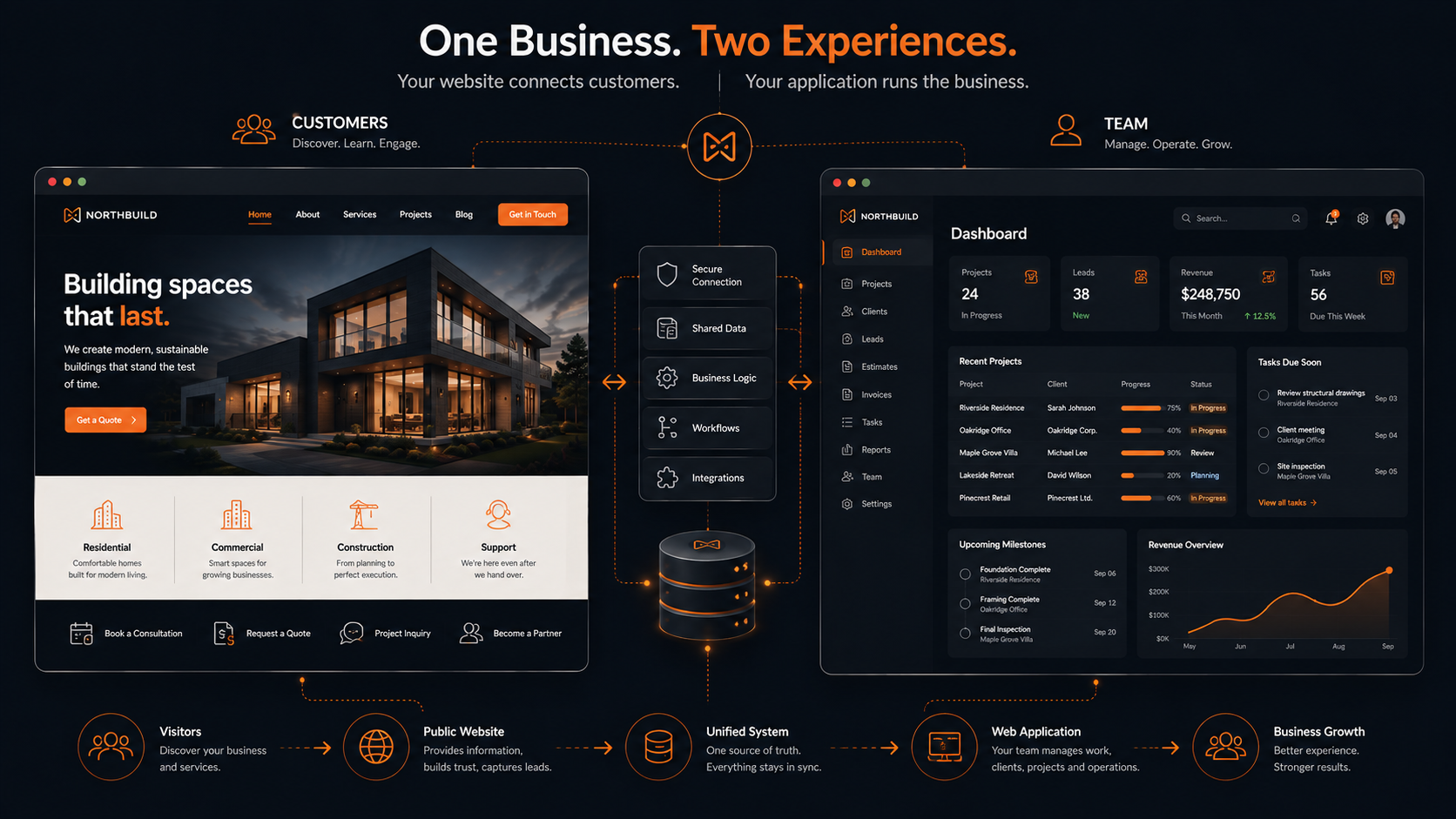
And sometimes the answer is both.
A business can have a marketing website on the outside and a web application behind the scenes. In many cases, that's exactly the right architecture.
The takeaway
The website vs web application question isn't really about whether something has buttons, forms, logins, or animations.
It's about the role the system plays.
A website communicates.
A web application operates.
And when a project needs both, they can work together.
Before deciding what technology to use, I'd spend more time understanding what the business actually needs to accomplish. That usually leads to a better product, a clearer scope, and a lot fewer expensive decisions later.